
Creating Orders
Once you have your API Key you can start using our APIs to build custom integrations and create orders directly in our system.
To create orders you'll need to know the Vinoshipper productId or SKU for your products. The products must also exist in your account on Vinoshipper.
A typical checkout flow usually involves the following steps:
- Products to order are selected
- A customer's information is collected for age verification and shipping
- Taxes and shipping are estimated and shown to the customer
- Finally an order is created
An Example
This example will use our internal test account, Slender Wines. This account has 3 products
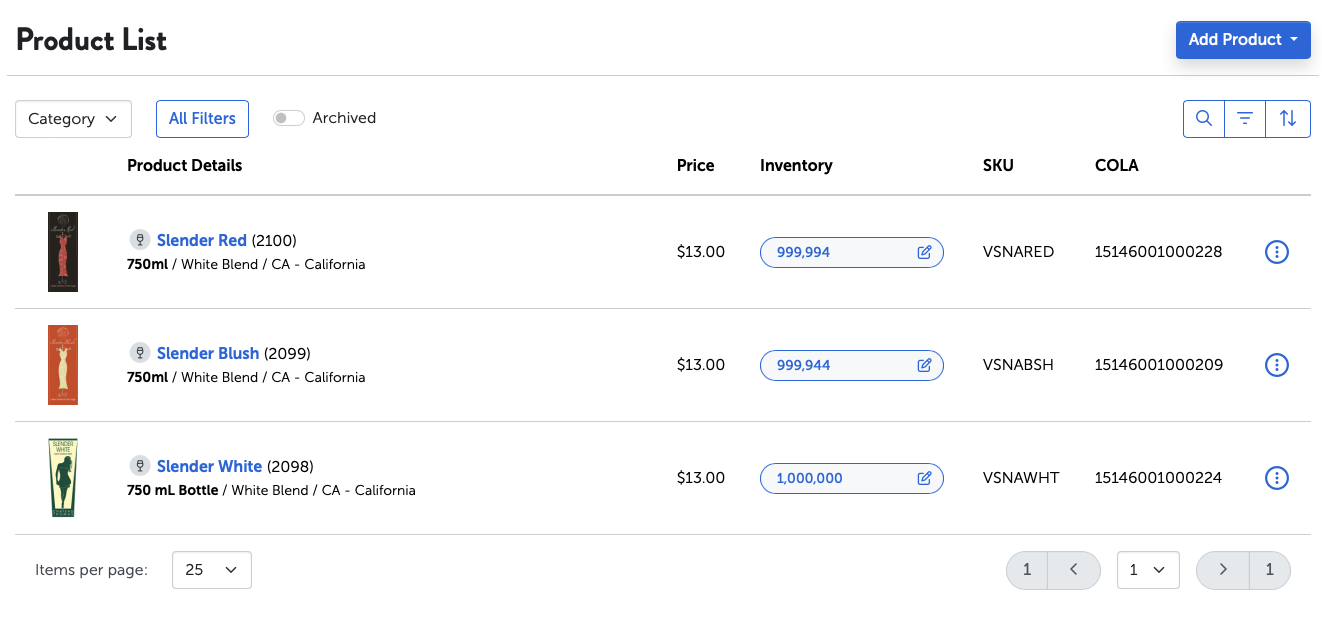
A customer, Jane Doe wants to order 2 bottles of Slender Red and 3 bottles of Slender white.
Shipping
First we'll estimate shipping using our Estimate Shipping API.
POST /api/v3/orders/estimate-shipping

Authorization: Basic 342.XXXXXXX XXX-XXXX
Accept: application/json
Content-Type: application/json

{
  "shipToAddress": {
    "street1": "123 Fake St",
    "city": "Sacramento",
    "postalCode": "95814",
    "stateCode": "CA",
    "country": "US"
  },
  "productIdType": "VS_ID",
  "products": [
    {"productId": "2100", "quantity": 2},
    {"productId": "2098", "quantity": 3}
  ]
}
{
"rates": [
{
"carrier": "UPS",
"rateCode": "03",
"price": 27.25,
"rateDescription": "UPS Ground"
},
{
"carrier": "UPS",
"rateCode": "12",
"price": 36.18,
"rateDescription": "UPS 3 Day Select"
},
{
"carrier": "UPS",
"rateCode": "02",
"price": 43.34,
"rateDescription": "UPS 2nd Day Air"
},
{
"carrier": "UPS",
"rateCode": "01",
"price": 31.60,
"rateDescription": "UPS Next Day Air"
},
{
"carrier": "UPS",
"rateCode": "14",
"price": 151.00,
"rateDescription": "UPS Next Day Air Early"
}
]
}The response contains a list of rates, you can show these to the customer. For our example, Jane Doe will select UPS Ground.
Taxes and Fees
With shipping selected we can now estimate taxes and fees using our Estimate Taxes API.
POST /api/v3/orders/estimate-taxes

Authorization: Basic 342.XXXXXXX XXX-XXXX
Accept: application/json
Content-Type: application/json

{
  "shipToAddress": {
    "street1": "123 Fake St",
    "city": "Sacramento",
    "postalCode": "95814",
    "stateCode": "CA",
    "country": "US"
  },
  "productIdType": "VS_ID",
  "products": [
    {"productId": "2100", "quantity": 2},
    {"productId": "2098", "quantity": 3}
  ],
  "shippingRate": {
    "carrier": "UPS",
    "rateCode": "03"
  }
}
{
"products": [
{
"productId": 2100,
"productName": "Slender Red",
"productVintage": "NV",
"sku": "VSNARED",
"upc": "",
"category": "Wine",
"productTaxonomy": {
"id": 42,
"externalId": "11001",
"displayName": "Wine",
"sortOrder": 0
},
"quantity": 2,
"price": 13.00,
"discount": 0,
"alcoholPercentage": 12.00,
"packProductId": null,
"taxes": {
"taxRate": 0.0875000,
"taxableValue": 26.00,
"taxes": 2.30
}
},
{
"productId": 2098,
"productName": "Slender White",
"productVintage": "NV",
"sku": "VSNAWHT",
"upc": "0609722583701",
"category": "Wine",
"productTaxonomy": {
"id": 42,
"externalId": "11001",
"displayName": "Wine",
"sortOrder": 0
},
"quantity": 3,
"price": 13.00,
"discount": 0,
"alcoholPercentage": 12.00,
"packProductId": null,
"taxes": {
"taxRate": 0.0875000,
"taxableValue": 39.00,
"taxes": 3.44
}
}
],
"shipping": {
"carrier": "UPS",
"rateCode": "03",
"price": 27.25,
"shipper": {
"id": 4263,
"name": "ShipitEZ",
"isFulfillmentCenter": true
},
"rateDescription": "UPS Ground",
"packages": [
{
"carrier": null,
"trackingNumber": null,
"box": {
"weight": {
"lbs": 16.00
},
"dimensions": {
"widthInches": 12.0,
"heightInches": 9.0,
"depthInches": 19.0
},
"containsAlcohol": true
}
}
],
"taxes": {
"taxRate": 0.0875000,
"taxableValue": 27.25,
"taxes": 2.38
}
},
"extraFees": [
{
"label": "CRV Fee (taxable)",
"amount": 0.50,
"description": null
}
],
"extraFeesTotal": 0.50,
"taxesTotal": 8.62,
"taxesTotalWithoutFees": 8.12,
"taxes": {
"county": null,
"countyTaxRate": 0,
"countyReportingCode": null,
"countyTaxes": 0,
"city": null,
"cityTaxRate": 0.0150000,
"cityReportingCode": null,
"cityTaxes": 1.39,
"state": null,
"stateTaxRate": 0.0725000,
"stateTaxes": 6.73,
"otherTaxRate": 0,
"otherTaxes": 0,
"customStateTaxes": 0
}
}The response provides a detailed breakdown of all the taxes and fees that should be charged. For displaying to a customer you can use the following 3 fields:
extraFeesTotal- The total amount of extra fees for this order.taxesTotalWithoutFees- The total taxes, excluding extra fees, for this order.taxesTotal- The combined grand total of taxes and fees for this order.
Creating an Order
Using the Create Order API and the the shipping and taxes from above we can now create a paid order.
Pass the extraFeesTotal as fees and taxesTotalWithoutFees as taxes in the request. We'll mark the order as paid by passing paid: true. See Paying For Orders below to learn more payments.
POST /api/v3/orders

Authorization: Basic 342.XXXXXXX XXX-XXXX
Accept: application/json
Content-Type: application/json

{
  "customer": {
    "email": "[email protected]",
    "firstName": "Jane",
    "lastName": "Doe",
    "dateOfBirth": {
      "day": 24,
      "month": 8,
      "year": 2000
    },
    "address": {
      "street1": "123 Fake St",
      "city": "Sacramento",
      "postalCode": "95814",
      "stateCode": "CA",
      "country": "US"
    }
  },
  "shipToAddress": {
    "street1": "123 Fake St",
    "city": "Sacramento",
    "postalCode": "95814",
    "stateCode": "CA",
    "country": "US",
    "phone": {"number": "2131231234", "country":  1}
  },
  "productIdType": "VS_ID",
  "products": [
    {"productId": "2100", "quantity": 2},
    {"productId": "2098", "quantity": 3}
  ],
  "shippingRate": {
    "rateCode": "03",
    "carrier": "UPS"
  },
  "paid": true,
  "fees": "0.50",
  "taxes": "8.12"
}
{
"orderNumber": "95183878031",
"cartType": "API",
"sourceUrl": null,
"status": "SUCCESS",
"orderStatus": "OPEN",
"customer": {
"email": "[email protected]",
"firstName": "Jane",
"lastName": "Doe",
"address": {
"street1": "123 Fake St",
"street2": null,
"city": "Sacramento",
"postalCode": "95814",
"stateCode": "CA"
},
"dateOfBirth": {
"day": 24,
"month": 8,
"year": 2000
},
"wholesale": false,
"company": null,
"id": null,
"fullName": "Jane Doe",
"customerSince": null
},
"shipToAddress": {
"id": null,
"salutation": null,
"firstName": "Jane",
"lastName": "Doe",
"businessName": null,
"fullName": "Jane Doe",
"street1": "123 Fake St",
"street2": null,
"city": "Sacramento",
"postalCode": "95814",
"stateCode": "CA",
"country": "US",
"phoneNumber": "2131231234",
"phone": {
"number": "2131231234",
"country": null,
"extension": null
},
"accessPoint": null,
"description": null,
"suspectedPOBox": false,
"poBox": false,
"linkedAddress": null
},
"productDiscount": 0,
"shippingDiscount": 0,
"products": [
{
"productId": 2100,
"productName": "Slender Red",
"productVintage": "NV",
"sku": "VSNARED",
"upc": "",
"category": "Wine",
"productTaxonomy": {
"id": 42,
"externalId": "11001",
"displayName": "Wine",
"sortOrder": 0
},
"quantity": 2,
"price": 13.00,
"discount": 0.00,
"alcoholPercentage": 12.00,
"packProductId": null,
"taxes": {
"taxRate": 0.0875000,
"taxableValue": 26.00,
"taxes": 2.30
}
},
{
"productId": 2098,
"productName": "Slender White",
"productVintage": "NV",
"sku": "VSNAWHT",
"upc": "0609722583701",
"category": "Wine",
"productTaxonomy": {
"id": 42,
"externalId": "11001",
"displayName": "Wine",
"sortOrder": 0
},
"quantity": 3,
"price": 13.00,
"discount": 0.00,
"alcoholPercentage": 12.00,
"packProductId": null,
"taxes": {
"taxRate": 0.0875000,
"taxableValue": 39.00,
"taxes": 3.44
}
}
],
"packs": [],
"shipping": {
"carrier": "UPS",
"rateCode": "03",
"price": 27.25,
"shipper": {
"id": 4263,
"name": "ShipitEZ",
"isFulfillmentCenter": true
},
"rateDescription": "UPS Ground",
"packages": [
{
"carrier": null,
"trackingNumber": null,
"box": {
"weight": {
"lbs": 16.00
},
"dimensions": {
"widthInches": 12.00,
"heightInches": 9.00,
"depthInches": 19.00
},
"containsAlcohol": true
}
}
],
"taxes": {
"taxRate": 0.0875000,
"taxableValue": 27.25,
"taxes": 2.38
}
},
"extraFee": 0,
"extraFeeDetails": [
{
"label": "CRV Fee (taxable)",
"amount": 0.50,
"description": null
}
],
"extraFees": [
{
"label": "CRV Fee (taxable)",
"amount": 0.50,
"description": null
}
],
"extraFeesTotal": 0,
"extraFeesAdjusted": 0.00,
"taxesTotal": 8.12,
"taxesAdjusted": 0.00,
"taxes": {
"county": "SACRAMENTO",
"countyTaxRate": 0,
"countyReportingCode": "n/a",
"countyTaxes": 0.00,
"city": "SACRAMENTO",
"cityTaxRate": 0.0150000,
"cityReportingCode": "322",
"cityTaxes": 1.39,
"state": "CA",
"stateTaxRate": 0.0725000,
"stateTaxes": 6.73,
"otherTaxRate": 0,
"otherTaxes": 0.00,
"customStateTaxes": 0.00
},
"tipAmount": 0.00,
"total": 100.87,
"specialInstructions": {
"producerNote": null,
"giftNote": null,
"shipDate": null,
"wineryNote": null
},
"isCompliant": true,
"purchasedAt": "2026-01-22T19:17:36Z",
"canceledAt": null,
"shippedAt": null,
"deliveredAt": null,
"metaFields": {},
"orderProblems": [],
"ageVerification": {
"verified": true,
"idScanUrl": "https://www.idology.com/solutions/identity-verification/"
},
"platformCharges": {
"fundsReceived": 0.00,
"creditCardFee": 0,
"pickPackFee": -20.11,
"vinoshipperFee": -4.95,
"shipping": -27.25,
"taxSales": -8.12,
"taxExcise": 0,
"stateFees": -0.50,
"amountDue": -60.93
},
"cancelReason": null,
"fulfillmentAccount": null,
"store": {
"id": 333,
"name": "Store 1"
},
"customerNotificationPreferences": null
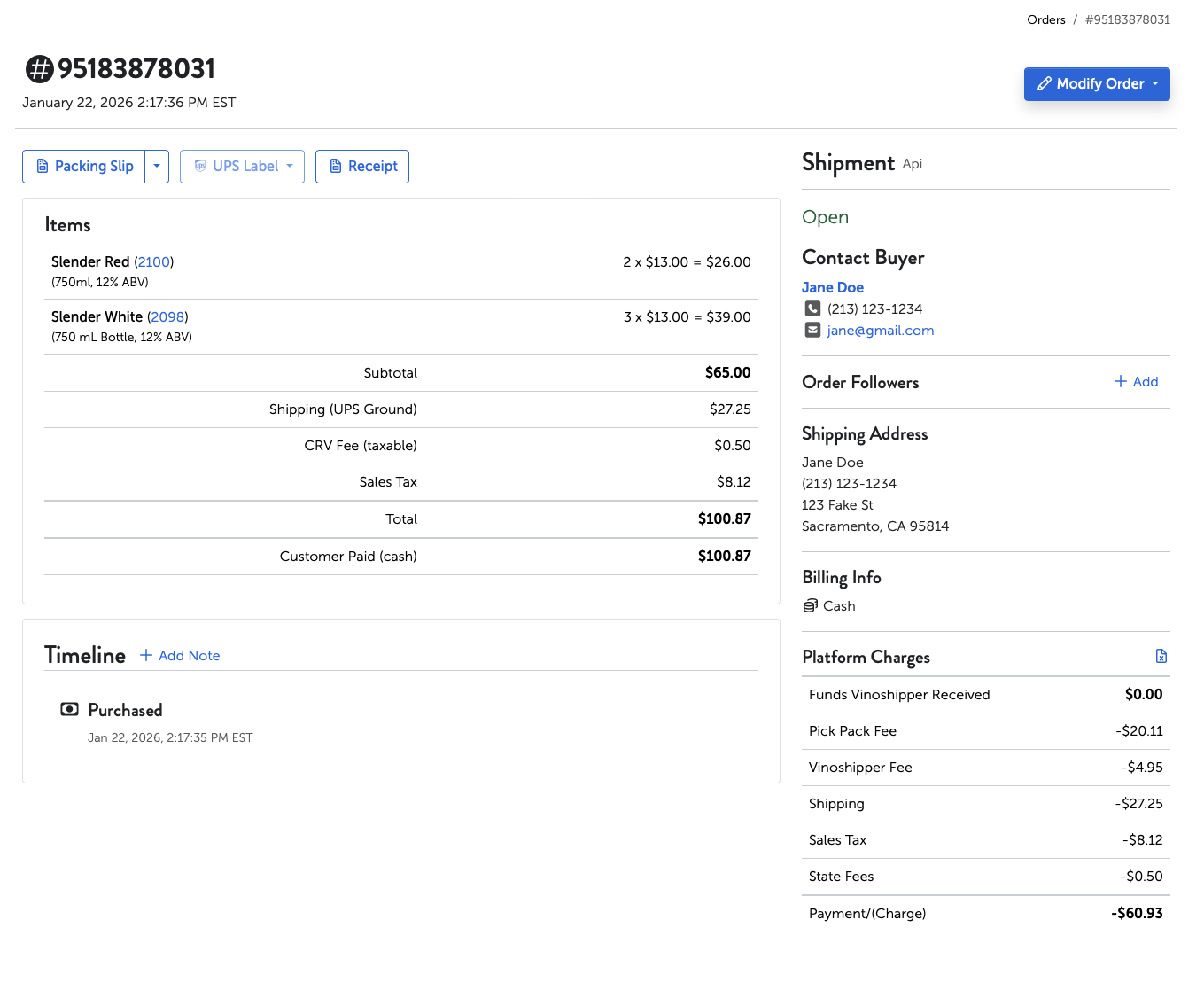
}And here is the order that was created in the Producer's dashboard:
Was the order successful?
An order was successfully created if you received an HTTP 200 response code and the JSON response indicates that status = SUCCESS and isCompliant = true.
Paying For Orders
Most the integrations we've seen are with platforms that collect payments on their side (Shopify for instance). Our API supports this by allowing by letting you paid:true when creating/updating an order. Orders that are marked as "paid" in this way show up as a "cash" payment when viewing the order in your account.
It's possible to use Stripe.js to collect a credit card and pay for an order. The payment has to be collected from our stripe account so we expose an API for this.
- First create an order, do not pass
paid: true. This will create aPENDINGorder. You won't seePENDINGorders in your account. - Call our Create SetupIntent API which returns
clientSecretandpublishableKey. - Initialize
Stripe(publishableKey)and call: -
stripe.confirmCardSetup(clientSecret, { payment_method: { card: cardElement } }) - Get back
paymentMethod.id - Finally, using the Purchase Order API, pay for the order:
POST /api/v3/p/orders/{orderNumber}/purchase

Authorization: Basic 342.XXXXXXX XXX-XXXX
Accept: application/json
Content-Type: application/json

{ "stripePaymentMethodId": "pm_xxxxx" }
Handling Errors
There are 4 types of errors you might encounter: validation errors, compliance errors, age verification errors, server errors.
Validation Errors
These errors indicate there was something wrong with the request. These are indicated by an HTTP 400 status with the following response body.
{
  "error": {
    "status": 400,
    "type": "VALIDATION",
    "errors": [
      {
        "description": "",
        "code": "required",
        "field": "shipToAddress",
        "shortDescription": null
      }
    ]
  }
}
These types of errors might indicate a bug in the code that is sending the request.
Compliance Errors
These errors indicate the order is not compliant in some way. Either the order cannot be shipped to a specific location or some compliance limit has been reached. In this case you will get back an HTTP status 200 but order will show status = PENDING and isCompliant = false. Along with those fields there will be an array of orderProblems that indicate what is wrong with the order.
Here is an example showing the relevant parts of the order response:
{
  "status": "PENDING",
  "isCompliant": false,
  "orderProblems": [
    {
      "code": "compliance.violation.currentOrder.productCannotShip",
      "description": "The Wine product, Slender Red, cannot be shipped to NH.",
      "type": "COMPLIANCE_VIOLATION"
    },
    {
      "code": "compliance.violation.currentOrder.productCannotShip",
      "description": "The Wine product, Slender White, cannot be shipped to NH.",
      "type": "COMPLIANCE_VIOLATION"
    }
  ],
}
In these cases you'll receive an order number back which allows you update the order by calling the Update Order API
Server Error
These are indicated by response returning a HTTP 5xx status code . They are can indicate bugs or temporary issues on our servers. Sometimes retrying the request will work for temporary issues.
{
  "error": {
    "status": 500,
    "type": "SERVER_ERROR",
    "errors": [
      {
        "description": "We're sorry, something went wrong. | Trace Id: 7e80ba90",
        "code": "",
        "field": null,
        "shortDescription": null
      }
    ]
  }
}
The error response will container a vs-trace-id header. It's a good idea to log the value of this header because we can use it to help debug what went wrong.
Updated 6 months ago